
Gazette Builder Stories are created by assigning a group of Entries the same Story ID and giving each Entry a Sequence Position.
There is no separate Story post type to create first. A Story is built from ordinary GazetteBuilder Entries.
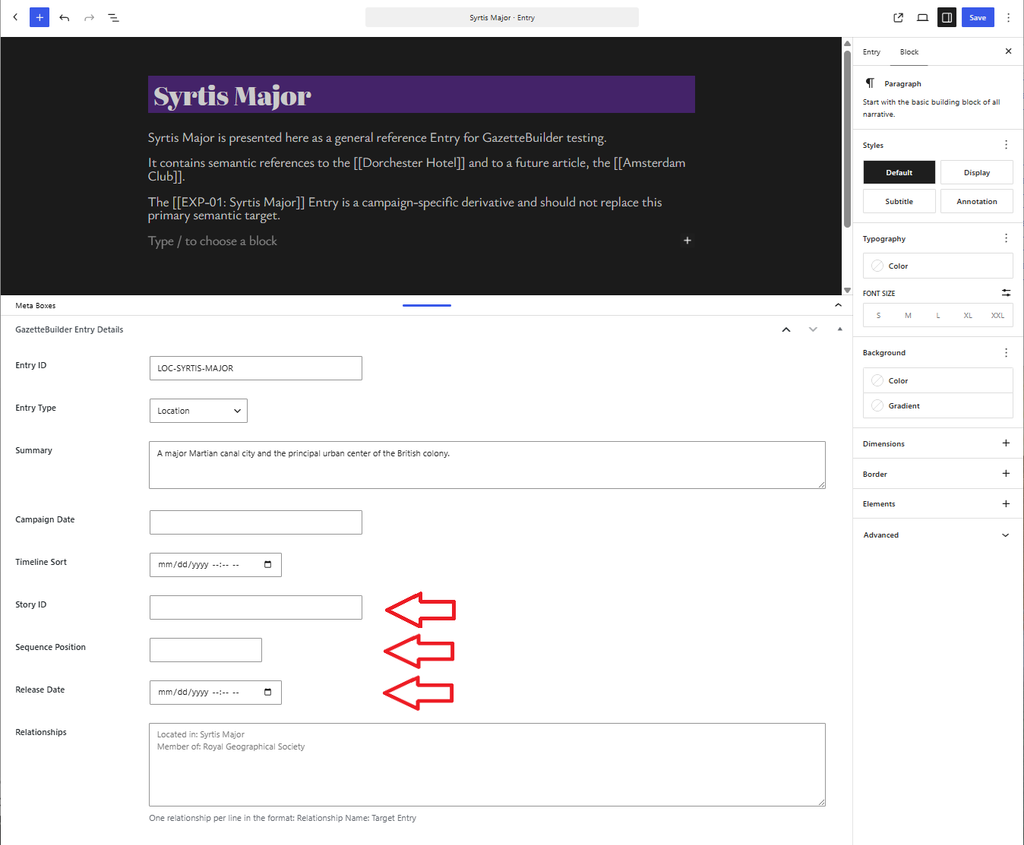
Create the Story Landing Entry
The Entry with:
Sequence Position: 0
acts as the Story landing page.
Give it the same Story ID that will be used by the rest of the sequence.
For example:
Story ID: EXP-01
Sequence Position: 0
This Entry serves as the starting point for the Story and provides the reader with the Story navigation controls.
Add Story Entries
Each Entry in the Story uses the same Story ID and a different Sequence Position.
For example:
Story ID: EXP-01Sequence Position: 0
Story ID: EXP-01Sequence Position: 1
Story ID: EXP-01Sequence Position: 2
Story ID: EXP-01Sequence Position: 3
Sequence Position determines reading order.
It is independent of Campaign Date and Timeline Sort, so a Story can contain flashbacks or other material that is chronologically out of order without affecting the intended reading sequence.
Story Fields on the Entry
Open an Entry and use the GazetteBuilder Entry Details section.
For Story participation, fill in:
Story ID
Identifies which Story the Entry belongs to.
Sequence Position
Determines where the Entry appears in that Story.
Release Date
Optional. Use this when the Entry should not become available to readers until a future date.
The Story landing Entry at position 0 also carries the Story-level display settings used for the sequence.
Reader Flow
Once the Story Entries are configured, Gazette Builder handles the reading sequence.
Depending on the reader’s progress and the Story’s current availability, the landing Entry can provide controls such as:
- Start
- Continue
- Restart
Entries within the sequence provide progression to the next available Story Entry.
Readers can also return to the Story landing page from within the sequence.
Release-Aware Stories
Story Entries can have future Release Dates.
For example:
Position 1 — available
Position 2 — available
Position 3 — future release
A reader can progress through positions 1 and 2, but Gazette Builder prevents access to position 3 until its Release Date is reached.
The Story sequence can therefore be prepared in advance without exposing later Entries early.
Unavailable Story Entries
Gazette Builder protects Story sequence positions that are not yet available.
If a reader attempts to reach an unreleased Story Entry directly, Gazette Builder redirects them away from that unavailable step rather than exposing it.
Continuing and Completed Stories
A continuing Story can end its currently available sequence with a continuation message such as:
To be continued…
When another Entry becomes release-eligible, the Story can continue from that point.
A finite Story can instead display its configured ending text when the reader reaches the true final Entry.
Editing a Story
Because Stories are built from Entries, Story changes are made by editing those Entries.
To move an Entry within the Story, change its Sequence Position.
To move an Entry to another Story, change its Story ID.
To remove it from Story sequencing, remove the Story information from that Entry.
To delay an installment, set its Release Date.