
Gazette Builder separates WordPress publication status from Gazette Builder release timing.
A published Entry may be available immediately, or it may be held back until a specific Release Date. This allows content to be prepared and published in WordPress without necessarily making it readable yet.
How Release Eligibility Works
The basic rule is:
- A published Entry with no Release Date is available immediately.
- A published Entry with a Release Date in the past or present is available.
- A published Entry with a future Release Date is withheld until that date arrives.
- A draft or otherwise unpublished Entry is not available to readers.
This means an empty Release Date and a dated Release Date behave differently.
An undated published Entry is treated as available now.
A dated published Entry is controlled by that date.
Release Date on an Entry
The Release Date field appears in the GazetteBuilder Entry Details section when editing an Entry.
Use it when an Entry should remain unavailable until a specific date and time.
For example:
Release Date: 09/15/2026 08:00
Until that date is reached, GazetteBuilder treats the Entry as unreleased even though WordPress itself may consider the Entry published.
Once the Release Date passes, the Entry becomes available automatically.
Leaving Release Date Empty
If the Release Date field is left empty, GazetteBuilder does not wait for a scheduled release.
A published Entry with no Release Date is immediately eligible for normal reader access.
This is useful for reference material that should simply become available as soon as it is published.
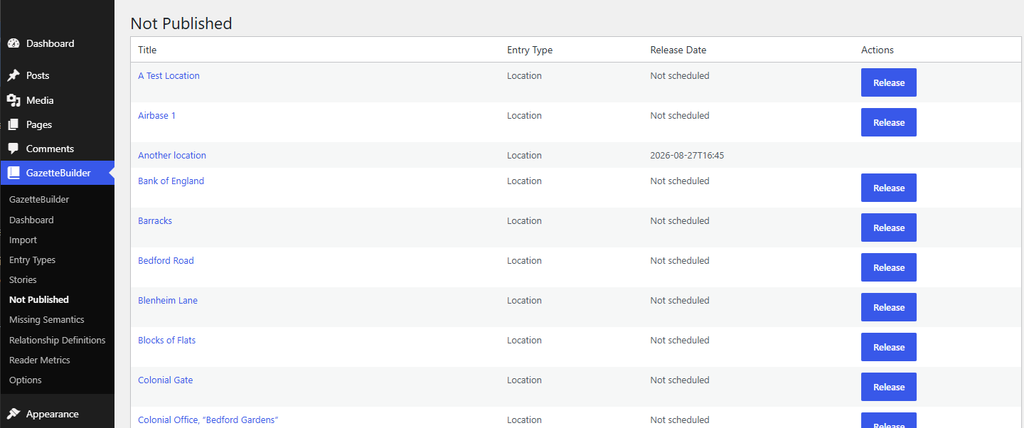
The Not Published Page
Gazette Builder provides a dedicated administration screen:
GazetteBuilder → Not Published
Despite the page name, this screen does not contain only Entries that are hidden from readers.
It includes Entries that do not currently have a recorded Release Date, including published Entries that are already available because their Release Date is blank.
That distinction is important.
A published Entry with an empty Release Date is immediately readable under GazetteBuilder’s release rules. It may still appear on the Not Published page because it has never been given a specific GazetteBuilder release timestamp.
In other words:
- Blank Release Date — the Entry is available immediately, but no formal release date has been recorded.
- Future Release Date — the Entry is withheld until that date.
- Past or current Release Date — the Entry has a recorded release date and is available.
The Not Published page is therefore useful for identifying Entries that have not yet been given a formal release date, not simply Entries that readers cannot see.
Release Immediately
Using the release action on the Not Published page assigns the current date and time as the Entry’s Release Date.
If the Entry was already readable because its Release Date was blank, this does not make previously hidden content visible. Instead, it changes the Entry from:
available with no recorded release date
to:
available with a recorded release date of now
The Entry remains readable afterward because its new Release Date is already eligible.
If the Entry was being withheld for some other release condition represented on the page, assigning the current date likewise makes it immediately release-eligible.
Why an Available Entry May Appear Here
Seeing a readable Entry on Not Published can look contradictory at first.
The reason is that Gazette Builder treats an empty Release Date as immediately available, while the administration page treats that same empty Release Date as not yet formally released with a recorded date.
So the page is best understood as a release-management queue rather than a simple list of inaccessible content.
Both are readable, but they preserve different release information.
Why the Distinction Matters
This gives GazetteBuilder two useful release patterns.
Immediate, Undated Publication
Publish the Entry and leave Release Date empty.
The Entry is available immediately and carries no Gazette Builder release timestamp.
Scheduled or Recorded Release
Give the Entry a Release Date, either in advance or by releasing it from the Not Published page.
The Entry becomes available when that date is reached and keeps that date as part of its release information.
The Not Published page is therefore not just an override. It converts withheld material into an immediately released, dated Entry.
Story Entries
Story Entries use the same release model.
A Story Entry with a future Release Date remains unavailable even if earlier Story positions are already readable.
Gazette Builder prevents readers from advancing into unreleased Story steps.
If a reader attempts to reach an unavailable Story position directly, Gazette Builder redirects them away from that step rather than exposing it early.
When the next Story Entry reaches its Release Date, normal progression can continue.
Release Dates and Other Gazette Builder Views
Release eligibility is also used by GazetteBuilder when determining whether an Entry should appear in reader-facing features.
A future-dated Entry should remain unavailable until its Release Date passes, even if it otherwise belongs in an Entry Type index, semantic relationship listing, timeline, or Story sequence.
This prevents unreleased material from becoming visible indirectly through another GazetteBuilder feature.
Typical Uses
For material that should be available as soon as it is published:
Status: Published
Release Date: empty
For material scheduled for later:
Status: Published
Release Date: future date
For material that was being withheld but should now be released:
- Open GazetteBuilder → Not Published.
- Locate the Entry.
- Use the page’s release action.
- Gazette Builder assigns the current date and time as the Release Date.
- The Entry becomes immediately available and remains released afterward.