
Relationship Definitions control the vocabulary GazetteBuilder uses for semantic relationships between Entries.
Open:
GazetteBuilder → Relationship Definitions
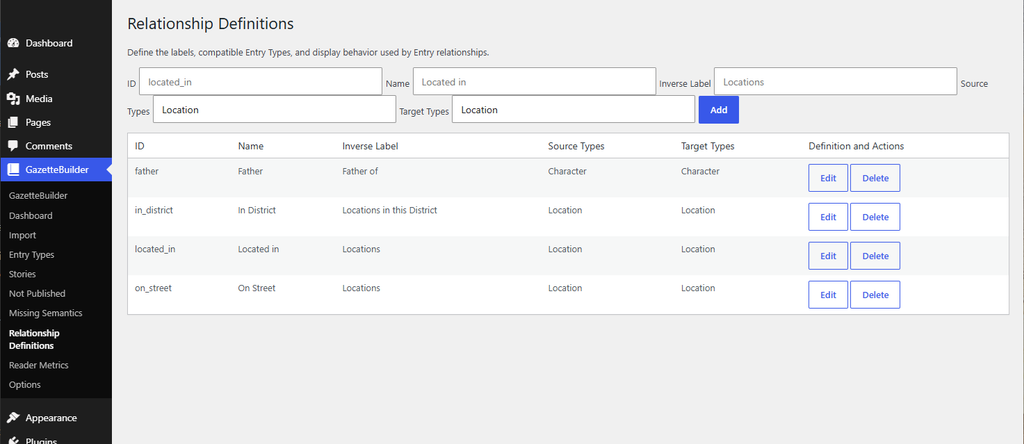
A Relationship Definition determines the relationship name, the types of Entries that may use it, the types of Entries it may point to, and the label used when GazetteBuilder presents the relationship in reverse on the target Entry.
Add a Relationship Definition
The fields at the top of the page create a new Relationship Definition.
The visible fields are:
- ID
- Name
- Inverse Label
- Source Types
- Target Types
After completing the fields, select Add.
ID
The ID is the internal identifier for the Relationship Definition.
For example:
located_in
The ID is separate from the human-readable relationship name.
Name
The Name is the canonical relationship text used when entering the relationship on an Entry.
For example:
Located in
An Entry using that Relationship Definition would therefore contain:
Located in: Syrtis Major
The Name is the controlled vocabulary for the relationship. Use the defined Name when entering relationships rather than substituting alternate wording.
Inverse Label
The Inverse Label controls how GazetteBuilder labels the generated reverse listing on the Target Entry.
For example:
Name: Located inInverse Label: Locations
If several Location Entries contain:
Located in: Syrtis Major
GazetteBuilder can use the inverse label Locations when presenting those Entries on the Syrtis Major Entry.
Another definition shown in the page is:
Name: In District
Inverse Label: Locations in this District
That allows a district Entry to present an appropriately named reverse section rather than a generic relationship label.
Source Types
Source Types identifies which Entry Types are permitted to use the relationship.
For example, the displayed located_in definition uses:
Location
as its Source Type.
That means the relationship is intended to originate from Location Entries.
Target Types
Target Types identifies which Entry Types may be used as the relationship target.
For the displayed located_in definition, the Target Type is also:
Location
This makes a declaration such as:
Located in: Syrtis Major
valid when both the source and target are Location Entries.
Existing Relationship Definitions
The table lists the currently configured Relationship Definitions.
The visible columns are:
- ID
- Name
- Inverse Label
- Source Types
- Target Types
- Definition and Actions
The screenshot shows examples including:
father
in_district
located_in
on_street
with corresponding names and inverse labels.
For example:
ID: in_district
Name: In District
Inverse Label: Locations in this District
Source Type: Location
Target Type: Location
and:
ID: on_street
Name: On Street
Inverse Label: Locations
Source Type: Location
Target Type: Location
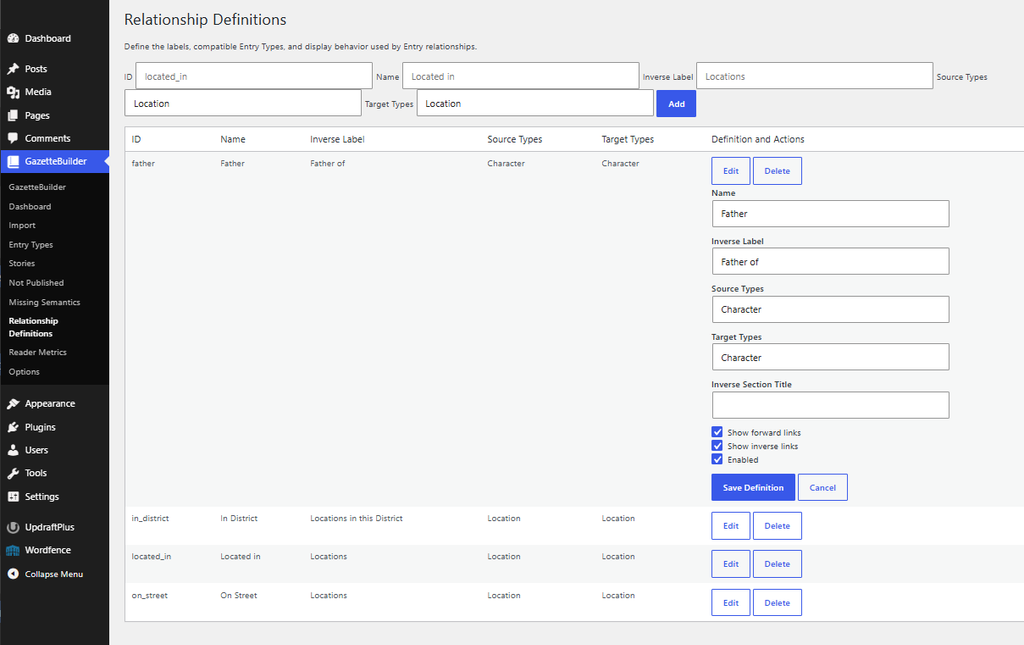
Edit
Select Edit to change an existing Relationship Definition.
Changes to the definition affect how GazetteBuilder interprets and presents relationships using that definition, so care should be taken when editing definitions already in use.
Delete
Select Delete to remove a Relationship Definition.
Because relationship declarations in Entries depend on these definitions, a definition should not be removed while it is still intentionally being used without first reviewing the affected Entries.
Relationship Definitions and Entry Editing
Relationship Definitions directly control what should be entered in the Relationships field of an Entry.
If the definition is:
Name: Located in
Source Type: Location
Target Type: Location
then a Location Entry can contain:
Located in: Syrtis Major
The text before the colon comes from the Relationship Definition’s Name.
The text after the colon identifies the Target Entry.
The format is:
Relationship Name: Target Entry
one relationship per line.
For example:
Located in: Syrtis Major
In District: Residency
On Street: Bedford Road
The available relationship names are therefore not free-form prose. They come from the Relationship Definitions configured on this page.
Why Definitions Matter
Relationship Definitions give GazetteBuilder enough information to understand more than a simple link.
They establish:
- what the relationship is called;
- what kind of Entry may originate it;
- what kind of Entry may receive it;
- how the reverse side should be labeled.
That allows a single declaration such as:
Located in: Syrtis Major
to support both the forward relationship on the source Entry and a generated reverse listing on the target Entry.